# Steps to conduct competitive audits
> Learn the seven steps of a competitive audit, from outlining goals and listing competitors to analyzing gaps and summarizing your findings.
Source: https://uxspot.io/conduct-competitive-audits
Step 1: Outline your goals
A competitive audit is a structured review of your competitors' products, designed to reveal their strengths, their weaknesses, and the opportunities they leave open for you.
Before you look at a single competitor, decide what you actually want to learn. An audit without a goal turns into an endless collection of screenshots that nobody reads. Your goals define what you compare, how deep you go, and when you are done.
Good goals are specific. "Check out the competition" is not a goal. "Compare the checkout flows of five food delivery apps to find out where users drop off" is. Maybe you want to understand how competitors onboard first-time users, how they present pricing, or how accessible their booking flow is for people using screen readers.
Write your goals down in one or two sentences and keep them visible while you work. Every time you are tempted to document something interesting but irrelevant, your goals will pull you back on track.
keywords
- #AuditGoals
- #Scope
- #Focus
Step 2: List your competitors
Next, decide who you are actually auditing. Aim for a list of five to ten competitors, and make sure it includes both types:
Direct competitors offer a similar product to a similar audience. If you are designing a meditation app, other meditation apps are your direct competitors. You share users, features, and often even pricing models.
Indirect competitors solve the same user problem in a different way, or offer a similar product to a different audience. For the meditation app, that could be a sleep-tracking app, a yoga studio's booking site, or a podcast platform full of relaxation content. Indirect competitors matter because your users compare you to them too, whether you like it or not.
To find competitors, search the way your users would. Type the problem into a search engine, browse app store categories, and ask participants in your research what they currently use. Resist the urge to audit twenty products. A smaller, well-chosen list gives you deeper insights than a shallow pass over everything on the market.
keywords
- #DirectCompetitors
- #IndirectCompetitors
- #MarketResearch
Step 3: Build a spreadsheet
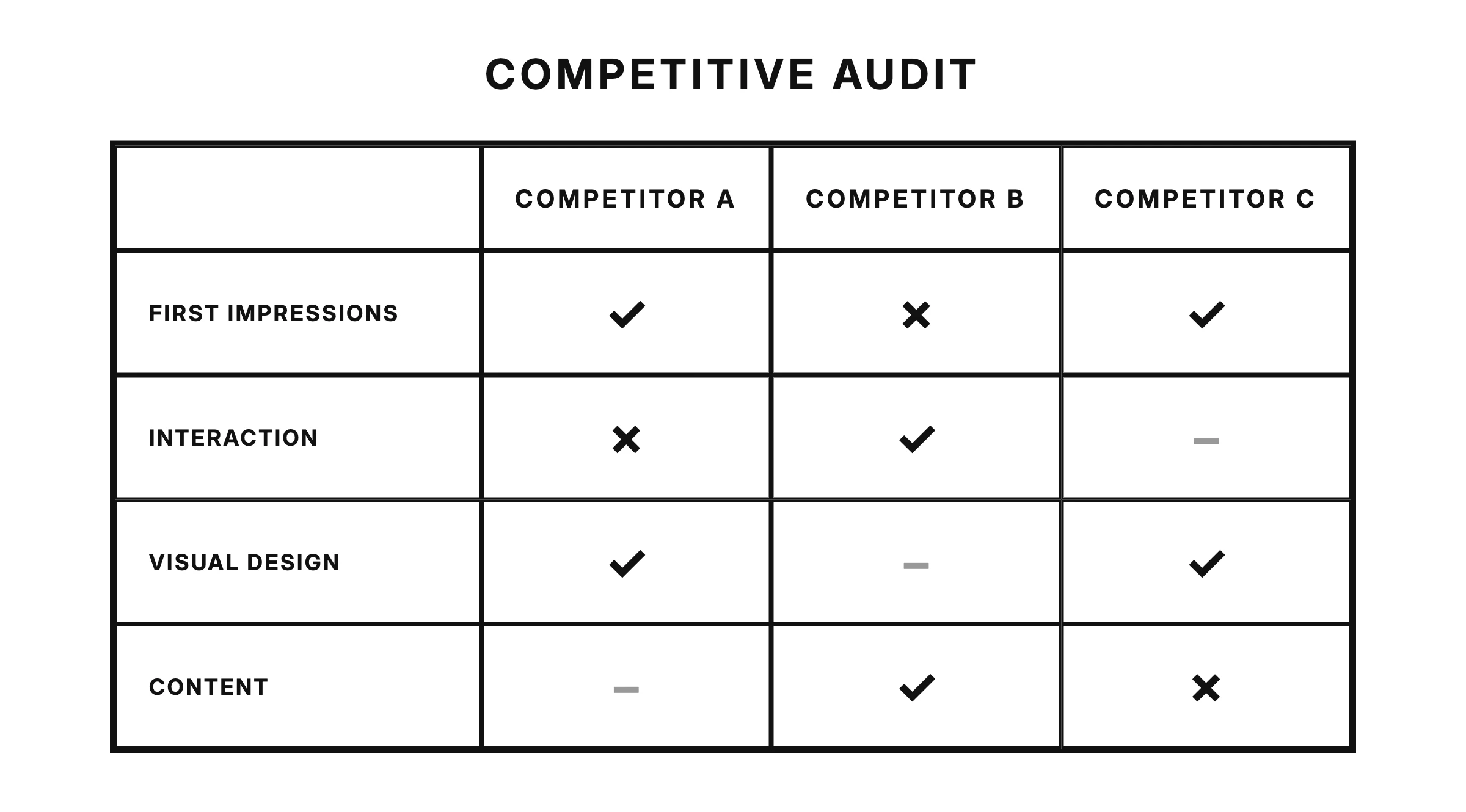
A competitive audit lives or dies by its organization, and the standard tool for the job is a simple spreadsheet. List your competitors in rows and your points of comparison in columns. The spreadsheet is not busywork. It forces you to evaluate every competitor against the same questions, which is what makes your comparison fair.
Start with the basics for each competitor: the product name, whether they are a direct or indirect competitor, their target audience, their value proposition, and a link to the product. Then add columns for the criteria you will choose in the next step.
Keep your notes in the cells short and factual. "Checkout requires account creation, 6 steps total" is useful. "Checkout feels bad" is an opinion you will not remember the reason for two weeks later. If a screenshot says it better, link to it from the cell rather than pasting walls of images into your notes.
keywords
- #Spreadsheet
- #Organization
- #Documentation
Step 4: Choose your criteria
Now decide exactly what you will evaluate. Your criteria should tie back to your goals from step one, but most UX audits cover five areas:
First impressions. What do you notice in the first few seconds on desktop and mobile? Is it obvious what the product does and who it is for?
Interaction. How smooth is the core user flow? Count the steps in key tasks like signing up or completing a purchase, and note where you got confused or stuck.
Visual design. Is the design consistent? Does the brand identity come through? Do layout and hierarchy guide your eye to what matters?
Content and tone. Is the writing clear and concise? Does the voice fit the audience, and does it stay consistent from the landing page to the error messages?
Accessibility. Check color contrast, text sizes, keyboard navigation, and image descriptions. Accessibility is one of the most common gaps in competitive audits, which makes it one of your biggest opportunities to stand out.
keywords
- #FirstImpressions
- #Interaction
- #VisualDesign
- #ContentTone
- #Accessibility
Step 5: Research each competitor
With your spreadsheet and criteria ready, it is time for the actual research. Go through each competitor one by one and evaluate them against every criterion. Use the real product wherever you can: create an account, complete a booking, abandon a cart and see what happens. Reading a review is not the same as feeling the friction yourself.
Work systematically. Complete one competitor fully before moving to the next, or evaluate one criterion across all competitors in a row. Either approach works, as long as you are consistent. Rate every competitor on the same tasks under the same conditions, otherwise your comparison is meaningless.
Note strengths as carefully as weaknesses. It is tempting to hunt for flaws, but the things a competitor does brilliantly are exactly the expectations your users will bring to your product. And watch your own bias: if you secretly admire one competitor, you will grade them gently unless your criteria keep you honest.
keywords
- #HandsOnResearch
- #Consistency
- #Bias
Step 6: Analyze your findings
Data becomes insight when you stop describing what competitors do and start explaining what it means for your product.
Once the spreadsheet is filled in, step back and look for patterns across three levels:
Trends. What does everyone do the same way? If every booking app confirms a reservation with a summary screen and an email, that is a convention your users expect. Breaking it needs a very good reason.
Gaps. What does nobody do well? Maybe all your competitors bury their cancellation flow, or none of them support dark mode. Gaps are unclaimed territory.
Opportunities. Where do the gaps overlap with your goals and your users' needs? Not every gap is worth filling. A feature nobody offers might be missing because nobody wants it. An opportunity is a gap that your research shows users actually care about.
keywords
- #Trends
- #Gaps
- #Opportunities
Step 7: Summarize what you learned
Finally, condense your analysis into a short written summary. Nobody, including future you, will re-read a fifty-column spreadsheet. Your summary should answer three questions: what did competitors do well, where did they fall short, and which opportunities should your product pursue?
Keep it to a page or less. Lead with the findings that connect directly to the goals you set in step one, and support each one with a concrete example from your research. A summary like "Competitors A and B both require account creation before checkout, and app store reviews complain about it, so guest checkout is an opportunity for us" is short, specific, and actionable.
This summary becomes the input for whatever comes next in your design process, and the raw spreadsheet stays available as evidence when someone asks how you reached a conclusion. Competitive audits also age quickly, so date your work and plan to revisit it. A competitive audit is a snapshot, not a monument; the market will have moved within months.
keywords
- #Summary
- #Insights
- #NextSteps