Design is never done
A design is never finished, only shipped. Iteration is not a phase you pass through once; it is the default state of design work.
Every usability test ends the same way: with a list of things that did not go as planned. That list is not a verdict on your talent. It is the raw material for your next version. Iteration is a loop, not a line: you design, you test, you learn, and you revise, then you run the loop again.
New designers often treat testing as a final exam. Experienced designers treat it as a conversation that never really ends. A booking flow that works beautifully today will meet new users, new devices, and new business requirements tomorrow. The loop is how your design keeps up.
-
keywords
- #IterativeDesign
- #DesignLoop
- #Revision
Turn findings into a fix plan
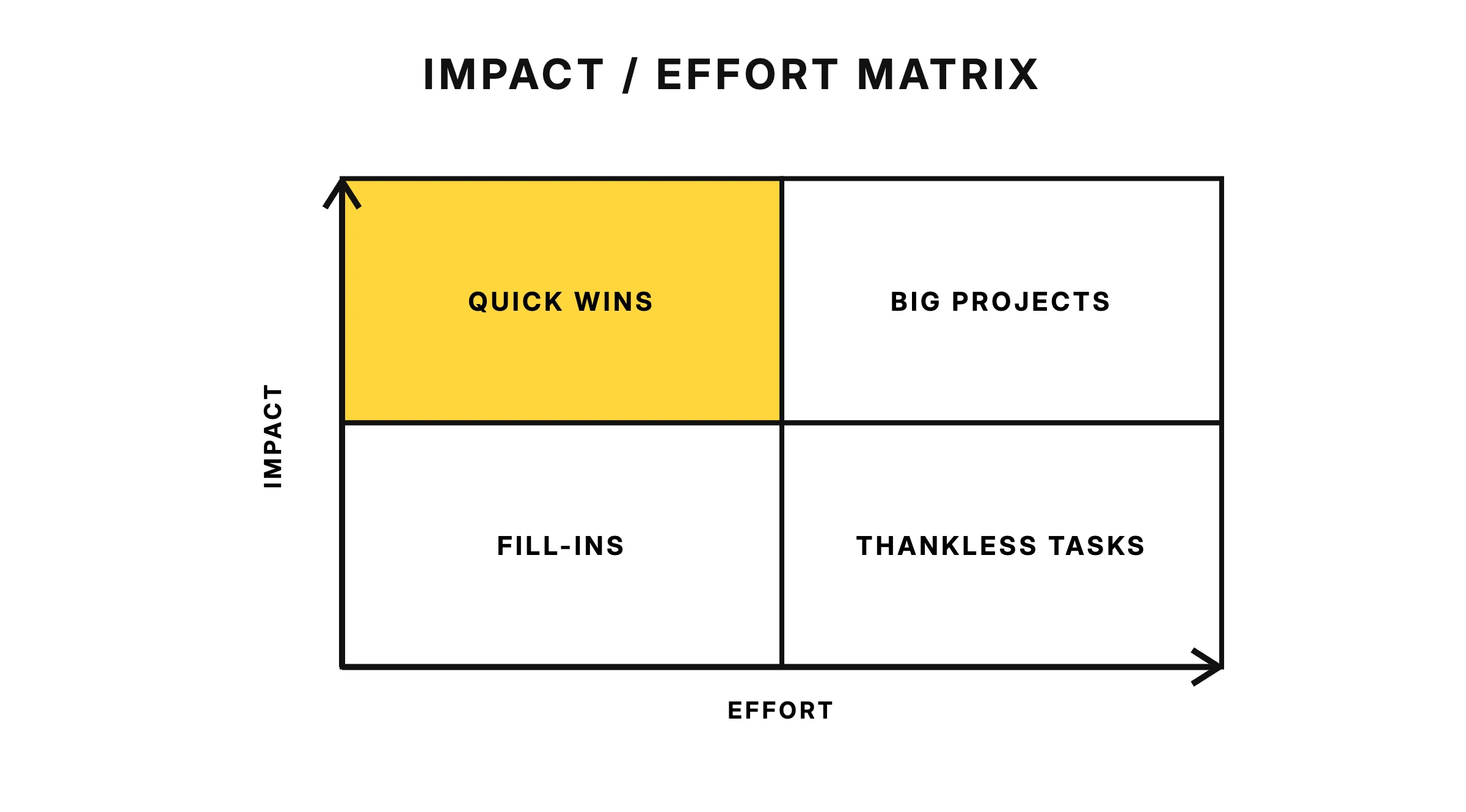
After a round of testing, resist the urge to fix everything at once. Triage your findings the way an emergency room triages patients: sort by severity first and effort second, then fix the problems that block users before the ones that merely annoy them.
Blockers. Problems that stop users from completing the task, such as a checkout button nobody could find. These get fixed first, no debate.
Friction. Problems that slow users down or cause hesitation, such as a confusing label on a form field. Fix these next, starting with the ones that are cheap to change.
Cosmetic issues. Small irritations that do not affect task success, such as inconsistent spacing. These can wait, or ride along with a bigger fix.
Within each severity band, separate quick wins from structural problems. Renaming a button is an afternoon of work. Reordering an entire signup flow is a project. Quick wins keep momentum and show your team that testing pays off; structural fixes need planning, alignment, and usually another round of testing.
-
keywords
- #Triage
- #Severity
- #QuickWins
- #FixPlan
Fix the cause, not the symptom
Suppose your test shows that users missed the "Save" button. The lazy fix is to bolt a tooltip onto it. The real work is asking why they missed it. Is the visual hierarchy pointing their eyes elsewhere? Is the label ambiguous? Is the button placed where nobody expects an action to live?
A symptom fix patches what users did; a cause fix changes why they did it.
When you treat symptoms, the same underlying problem resurfaces somewhere else in the product wearing a different costume. A tooltip on one lost button does nothing for the next screen built with the same weak hierarchy. Ask "why did this happen?" a few times before deciding what to change, and your fix will improve every screen that shares the flaw.
-
keywords
- #RootCause
- #Hierarchy
- #Labels
- #Placement
Change one thing at a time
When you revise, change one meaningful thing at a time wherever you can. If you rename the button, move it, and recolor it all at once, and the next test goes well, you have no idea which change did the work. If you change five things and results improve, you have learned almost nothing; if you change one thing, you have learned exactly what mattered.
This is not always practical. Structural fixes often drag several smaller changes along with them, and that is fine. The principle is to isolate the changes you need to learn from, not to slow yourself down for its own sake.
Re-testing follows the same logic. Blockers always get re-tested, because you cannot ship on the hope that a fix worked. Structural changes get re-tested, because big changes create new problems as often as they solve old ones. Cosmetic fixes can ride along in the next scheduled round; they rarely deserve a session of their own.
-
keywords
- #OneChange
- #ReTesting
- #Validation
Track your design decisions
Three months from now, someone will ask why the primary action sits at the top of the screen instead of the bottom. If your only answer is a shrug, the debate starts over from zero. A simple decision log turns old arguments into settled evidence: "we tried the bottom placement in round two, and users scrolled past it."
Your log does not need to be fancy. For each significant change, note what you changed, why, what you observed in testing, and what you decided. Keep it next to your design files where the whole team can find it. The goal is to make sure revisits build on what you learned instead of relitigating it.
-
keywords
- #DecisionLog
- #Documentation
- #Evidence
Avoid iteration traps
Not all iteration is progress. Some loops just spin. Watch for these three patterns.
Pixel-polishing loops
This is iterating on visuals when the problem is the flow. If users abandon a checkout because it demands account creation before payment, no amount of button refinement will save it. When a round of visual tweaks changes nothing in your test results, the problem is probably a level deeper than the pixels.
Stakeholder ping-pong
This is iterating toward opinions instead of evidence. One stakeholder wants the banner bigger, another wants it gone, and the design bounces between them for weeks. The cure is to anchor every revision to something a user did or said in testing. Opinions are inputs; observations are direction.
Scope creep dressed as iteration
This is adding new features under the banner of "improving" the design. A revision round for a search results page quietly grows filters, saved searches, and a comparison view. New scope is sometimes the right call, but it is a new decision that deserves its own research, not a stowaway on a fix list.
-
keywords
- #PixelPolishing
- #StakeholderPingPong
- #ScopeCreep
Know when to ship
Good enough to ship means users can complete the core task without blockers, not that every finding has been fixed.
Because iteration never truly ends, you need a stopping rule for each release. A practical one: ship when the blockers are gone, the worst friction is addressed, and the remaining issues are logged for the next round. Perfection is not on the menu; a shipped design that real users can teach you about is worth more than a flawless mockup nobody has touched.
Ship it, watch what happens, and start the loop again.
-
keywords
- #GoodEnough
- #Shipping
- #StoppingRule